
This website has been optimised to give you the best view possible, and we know that not everyone is a computer wiz, so here is a bit of help. To change the resolution from your present one you must follow the instructions below. |
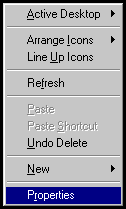
1. Right click the mouse on the desktop and click on Properties. 2. Click on the last tab on the right, called Settings.
4. Press OK and you should be alright from here on just follow you head.
If you have any further problems, please e-mail the webmaster to see if he can be of help. |
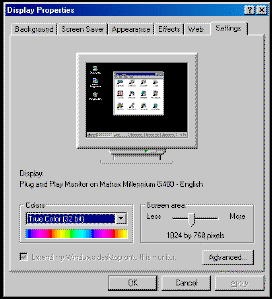 3. Change the Screen Area
on the right, bottom to 1024 by 768, remember to increase your colours to their maxium, to get the best results.
3. Change the Screen Area
on the right, bottom to 1024 by 768, remember to increase your colours to their maxium, to get the best results.